
A practical, field-tested guide to Oracle UCM in Fusion Cloud, written for technical consultants who need more than a surface-level explanation. Learn…
Quick answer, for anyone skimming
UCM (Universal Content Management, also called Oracle WebCenter Content) is Fusion Cloud's file-staging repository. You upload a file to a specific UCM account, then an ESS job picks it up, loads it into interface tables, validates it, and moves it into base application tables. UCM never validates or imports data itself — it only stores the file securely. If you remember one thing from this article, make it that separation: UCM stores, ESS processes. Everything else below is detail on how that plays out in real implementations.
Why I'm Rewriting This Topic (Again)
I've lost count of how many "UCM explained" posts exist online, and most of them stop at the same three sentences: it's a content repository, you upload FBDI files to it, then an ESS job imports them. True, but useless the first time your file uploads cleanly and nothing happens on the Fusion side. That gap — between "the upload succeeded" and "the data actually landed in the base table" — is where most of the real troubleshooting time goes on any integration project.
So this is a rewrite with the missing middle filled in: the two-stage ESS mechanics, the actual account naming convention (which nobody gets right on the first try), real SOAP/REST payload shapes for ErpIntegrationService, and the failure patterns you'll genuinely hit in production. Everything technical here has been checked against Oracle's own ERP Integration Service documentation and the OIC ERP Adapter docs, not just recalled from memory.
What Exactly Is UCM in Oracle Fusion?
UCM stands for Universal Content Management. In current Oracle documentation you'll also see it called Oracle WebCenter Content — same server, two names, depending on which doc set you're reading. Don't let that trip you up when a support note says "WebCenter Content" and your functional lead says "UCM."
Functionally:
UCM is a secure, account-scoped file repository. Files land there before any ESS process reads them. UCM does not parse CSVs, validate business rules, or write to application tables — it just stores bytes with access control.
Typical file types you'll see moving through it:
- FBDI ZIP files (CSV data + a manifest/properties file — see below)
- HDL files for HCM bulk loads
- Supplier, invoice, customer, and journal import files
- Transaction attachments
- Extract/export output from
exportBulkData - General integration payloads staged by OIC
Why Does Fusion Force Everything Through a Staging Layer?
Because Fusion doesn't expose a direct DML path for bulk loads into application tables — and that's deliberate, not a limitation. The staged design buys you three things you'd otherwise have to build yourself: an audit trail of exactly what was submitted, a safe place to inspect and correct bad records without touching production tables, and the ability to re-run a failed load without re-extracting from source.
The standard path looks like this:
- Generate the file in Oracle's expected layout (FBDI template or HDL).
- Upload it to the correct UCM account for that module/process.
- Submit the ESS job(s) that own that account.
- Fusion loads raw rows into interface tables.
- A second job validates and moves qualifying rows into base tables.
- Failed rows are written to an error file; Fusion also auto-purges the input/output files from UCM after a retention window.
The Two-Stage ESS Process (This Is Where Most Guides Get Vague)
This is the part worth slowing down on, because "my file uploaded but nothing got imported" is almost always a misunderstanding of these two stages.
Stage 1 — Interface load.
The generic process — Load Interface File for Import, or Load Multiple Interface Files for Import for automated multi-file pipelines — reads the ZIP off UCM, unzips it, and inserts raw rows into the module's interface tables (e.g., AP_INVOICES_INTERFACE / AP_INVOICE_LINES_INTERFACE for Payables, GL_INTERFACE for General Ledger, POZ_SUPPLIERS_INT_HEADER for supplier import). No business validation happens here yet.
Stage 2 — The module-specific import job.
A separate job — Import Payables Invoices, Journal Import / JournalImportLauncher, Import Suppliers, Import AutoInvoice, and so on — reads from the interface tables, validates against setup data (business unit, ledger, supplier site, currency, cross-validation rules), and writes qualifying rows to base tables. Rejected rows stay in the interface/error tables for correction.
Some Oracle-delivered parent processes chain both stages automatically when you submit them from the UI. Others genuinely require you to submit them as two separate steps. Check the specific import's documentation rather than assuming — this single assumption is behind a large share of "the file's fine, why isn't the data there" tickets I've seen.
Two important operational details Oracle documents but rarely gets repeated elsewhere:
- Auto-purge runs by default after each FBDI process. Fusion packages the interface and error data as a consolidated ZIP, stores it against the UCM account, and purges the interface/error tables. That backup ZIP — and any input/output files on UCM — is retained for roughly 30 days, then auto-purged.
- If auto-purge is enabled, you can't use the ADFdi correction spreadsheet workflow. You have to download the purge ZIP (via
File Import and Exportor thegetDocumentForDocumentIdoperation), correct the erroneous rows in the interface CSV, and resubmit through the normal FBDI process.
What's Actually Inside the ZIP You Upload?
Not just a CSV. A proper FBDI submission ZIP contains:
- One or more CSV data files — one per interface table the business object touches
- A manifest/properties file describing the job: job name, parameters, and (in advanced scenarios) a
JobDetailFileNamereference
If you're calling ErpIntegrationService directly instead of going through the FBDI Excel macro, this properties file's job details get passed as explicit parameters in your SOAP/REST payload instead — shown below.
The UCM Account: The One Detail That Silently Breaks Every Import
Every file lands under an account — a namespaced path that tells Fusion which module and process owns it. This is the detail almost every "UCM explained" article gets vague about, and it's the single most common cause of a "successful" upload that never gets processed.
Real account names use a dollar-sign-delimited segment format, for example:
fin$/payables$/import$
fin$/fusionAccountingHub$/import$
hcm$/dataloader$/import$
scm$/supplyOrder$/import$
Notice the pattern: `<pillar>/<module>/<module> /<module>/<process>‘.Uploadto‘fin`. Upload to `fin ‘.Uploadto‘fin/payables/import/import /import` when the job you're triggering actually reads from `fin/receivables/receivables /receivables/import$`, and you'll get a clean upload response with a document ID — and an ESS job that finds nothing, because it's only scanning its own account. There's no error telling you the account was wrong; the job just completes having processed zero rows. Always confirm the account against Oracle's predefined list for the specific import job you're targeting (referenced per-module in "Using External Data Integration Services for Oracle ERP Cloud") rather than inferring it from a similar-looking one.
How Files Actually Reach UCM (Three Real Paths)
1. Manual — File Import and Export
Navigator → Tools → File Import and Export. You pick the file, select the account, upload, then manually submit the scheduled process. Fine for testing and one-off migrations; not something you'd wire into a production pipeline.
2. Automated — OIC's ERP Adapter
This is the standard production pattern, and it's worth understanding what the adapter is actually doing rather than treating it as a black box.
When you select "Import Bulk Data into Oracle ERP Cloud" on the Actions page of the ERP Adapter's Endpoint Configuration Wizard, OIC:
- Uploads your ZIP (data + manifest) to the configured UCM account
- Submits the ESS job against that upload
- Optionally subscribes to the
ErpImportBulkDataEventbusiness event, so a separate callback integration fires automatically on job completion — no polling required
One config detail that catches people out: if you bypass the wizard's "Import Bulk Data" option and call importBulkData directly through a generic SOAP/REST invoke instead, you must set the jobOptions parameter yourself, e.g.:
jobOptions = ExtractFileType=ALL,InterfaceDetails=TO_DETERMINEjobOptions is mandatory for FBDI imports and specifically required to receive the callback. The wizard sets this for you when you use the dedicated action — which is exactly why skipping the wizard for a "quicker" generic SOAP call tends to produce imports that succeed but never trigger a callback.
End-to-end shape for a typical nightly load:
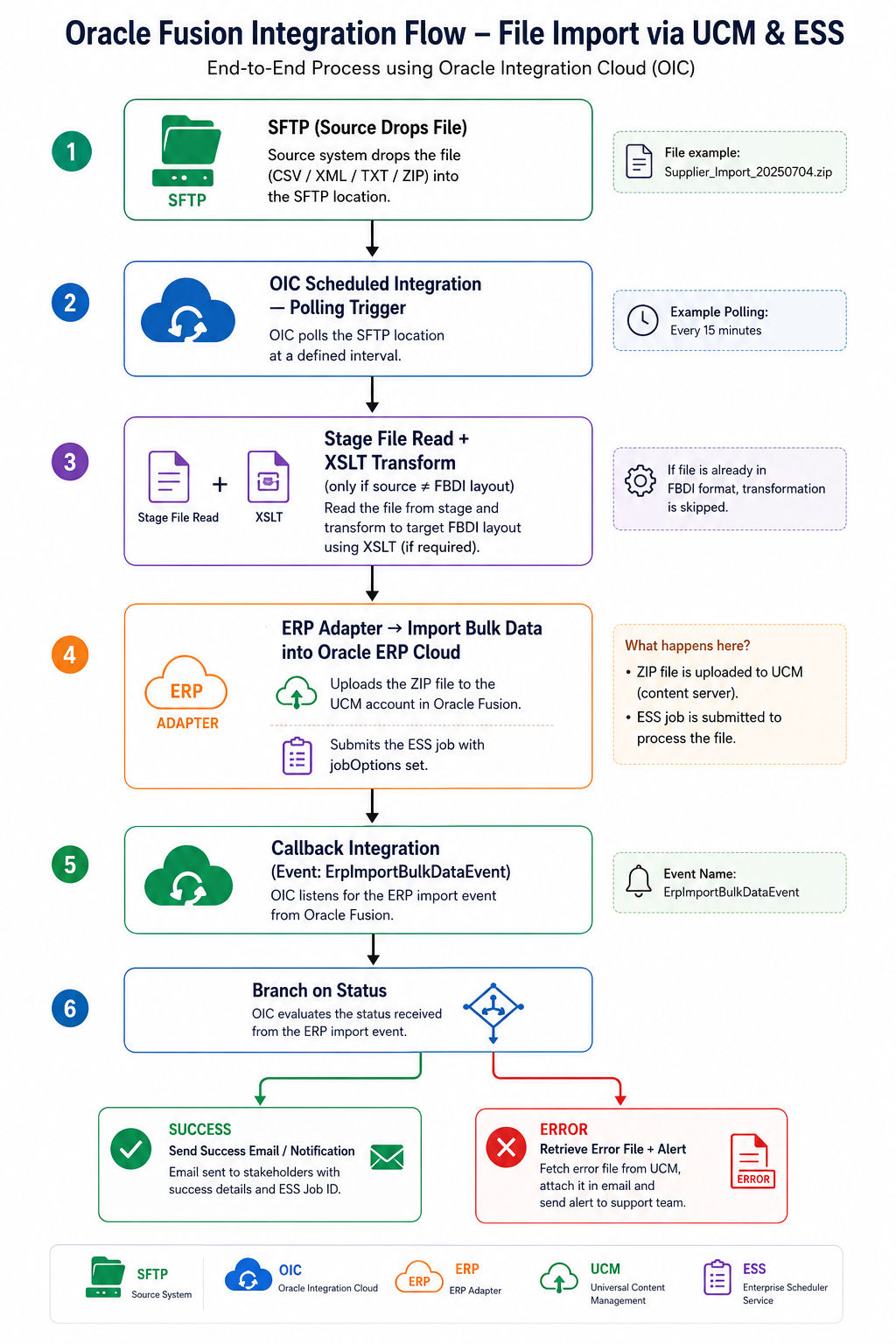
For source files that don't natively fit FBDI's exact column layout, OIC's XSLT mapper is the standard transform point. For genuinely large source files (Oracle's own examples reference files in the hundreds-of-MB range), use Stage Read to chunk-process instead of loading the whole payload into memory — a naive single-pass transform on a large file is a common cause of integration timeouts that have nothing to do with UCM or ESS at all.
3. Direct — ErpIntegrationService (SOAP/REST)
For custom middleware — Java, .NET, a homegrown SOA/OSB composite, or a script calling REST directly — Oracle exposes ErpIntegrationService with named operations worth knowing:
| Operation | Purpose |
|---|---|
| importBulkData | Uploads to UCM and submits the ESS job in one call (recommended over the deprecated loadAndImportData) |
| uploadFileToUcm | Upload only, no job submission |
| submitESSJobRequest | Submits a job against a file already sitting on UCM |
| getESSJobStatus | Polls status of a submitted request |
| getDocumentForDocumentId | Downloads a file (import output or export result) by UCM document ID |
Sample SOAP payload — importBulkData for a journal import (abbreviated; content is Base64 of the ZIP):
<soap:Body>
  <ns1:importBulkData
      xmlns:ns1="http://xmlns.oracle.com/apps/financials/commonModules/shared/model/erpIntegrationService/types/">
    <ns1:document
        xmlns:ns2="http://xmlns.oracle.com/apps/financials/commonModules/shared/model/erpIntegrationService/">
      <ns2:Content>UEsDBBQAAAAIA...(base64 zip content)...</ns2:Content>
      <ns2:FileName>JournalsImportTEST_1234.zip</ns2:FileName>
    </ns1:document>
    <ns1:jobDetails
        xmlns:ns2="http://xmlns.oracle.com/apps/financials/commonModules/shared/model/erpIntegrationService/">
      <ns2:JobName>oracle/apps/ess/financials/generalLedger/programs/common,JournalImportLauncher</ns2:JobName>
      <ns2:ParameterList>1061,Payables,1,ALL,N,N,N</ns2:ParameterList>
    </ns1:jobDetails>
    <ns1:notificationCode>30</ns1:notificationCode>
    <ns1:callbackURL>http://hostname:port/myCallbackService</ns1:callbackURL>
    <ns1:jobOptions></ns1:jobOptions>
  </ns1:importBulkData>
</soap:Body>
The response returns a Request ID for the job loading data into the interface table — that ID is what you feed into getESSJobStatus (or wait for the callback) to confirm the full chain actually completed, not just that the file was accepted.
REST equivalent shape (POST /fscmRestApi/resources/{version}/erpintegrations), conceptually:
{
  "OperationName": "importBulkData",
  "DocumentContent": "UEsDBBQAAAAIA...",
  "FileName": "PozSupplierInt.zip",
  "ContentType": "zip",
  "DocumentAccount": "fin$/payables$/import$",
  "JobDefName": "SupplierImportEss",
  "JobPackageName": "/oracle/apps/ess/prc/poz/supplierRegistration",
  "ParameterList": "24,#NULL,#NULL,N,N",
  "NotificationCode": "30",
  "CallbackURL": "#NULL",
  "JobOptions": "ExtractFileType=ALL,InterfaceDetails=TO_DETERMINE"
}
A field-level gotcha worth flagging explicitly: for supplier import specifically, the interface-details parameter has to match Oracle's expected value (commonly 24 for the standard supplier control file) — pass the wrong value here and the job can't locate the correct interface layout even though the file itself is perfectly valid.
Always pull the exact JobName/JobPackageName/ParameterList sequence from Manage Custom Enterprise Scheduler Jobs for your module, or from a manually-submitted run of the same job — guessing the parameter order/count is the fastest way to get a job submission that fails silently on parameter mismatch.
Real Scenario: Nightly Invoice Import Automation
Requirement: A third-party billing system drops supplier invoice files nightly. Finance wants them landed in Payables with zero manual intervention.
Build:
- OIC polls SFTP on schedule, picks up the file.
- Structural validation runs before anything touches Fusion — fail fast rather than burning an ESS job run on a malformed file.
- ERP Adapter uploads the ZIP to the Payables UCM account (
fin$/payables$/import$) withjobOptionsset correctly. - The adapter submits the invoice import job and registers the callback.
- On success: confirmation email with row count, pulled from the ESS job's completion payload.
- On failure: the error ZIP is retrieved via
getDocumentForDocumentIdand attached to a support ticket automatically.
Stack: OIC, UCM, FBDI, ESS, SFTP, ErpImportBulkDataEvent callback, email notification.
Common Failure Patterns (and What They Actually Mean)
| Symptom | Root cause |
|---|---|
| Upload succeeds, nothing imports | Wrong UCM account |
| Job submission fails immediately | ParameterList sequence/count wrong for that job |
| No callback ever fires | jobOptions not set on a direct SOAP call (bypassed the wizard default) |
| Interface load succeeds, base-table import fails | Data validation issue — bad BU, ledger, currency, or supplier site, not a UCM/ESS problem |
| Can't use correction spreadsheet after a failed run | Auto-purge already ran; pull the purge ZIP and resubmit instead |
Best Practices That Actually Hold Up in Production
- Name files with source, module, and timestamp —
SUPPLIER_IMPORT_20260704_103000.zip— so you can trace a failure back to a run without opening the ESS log first. - Validate before upload, not after the ESS job rejects it — check mandatory fields, date/number formats, and reference values (BU, ledger, supplier) in the integration layer.
- Use a dedicated integration user scoped to only the roles it needs, never a personal account borrowed for "just this one integration."
- Capture the UCM document ID from every upload response for audit and troubleshooting — don't rely on file name alone to trace a run later.
- Prefer the event callback over polling wherever the ERP Adapter supports it; polling burns API calls and adds latency to your failure-detection loop.
- Batch large volumes into smaller runs — easier error isolation, and it matches Oracle's own performance guidance.
- Don't fight the 30-day auto-purge — archive input files and error reports in your own system if you need longer retention than Fusion provides natively.
- Build retry and notification logic into the integration itself, not as an afterthought bolted on after the first production failure.
- Pull job parameters from a manual run first. Before automating any
importBulkDatacall, submit the job manually once from the Fusion UI and note the exact parameter sequence — it's the fastest way to avoid a silent parameter-count mismatch in production.
FAQ
What does UCM stand for in Oracle Fusion? Universal Content Management — also referred to as Oracle WebCenter Content in newer documentation. Same underlying server.
Does UCM validate or import data? No. UCM only stores the file under an account. All validation and loading happens in ESS jobs that run after the upload.
What's the difference between Load Interface File for Import and the module-specific import job?
The first loads raw CSV rows into interface tables with no business validation. The second validates and moves qualifying rows into base tables. They're two separate steps — some flows chain them automatically, others don't.
Why did my file upload succeed but nothing got imported? Almost always a wrong UCM account. The ESS job only scans the account it's configured against; an upload to the wrong account returns a clean success response but is invisible to the job you actually wanted to trigger.
Can OIC upload directly to UCM?
Yes, through the ERP Adapter's "Import Bulk Data into Oracle ERP Cloud" action, which also submits the ESS job and can subscribe to the ErpImportBulkDataEvent callback.
What's inside the ZIP for an FBDI submission? CSV data file(s) plus a manifest/properties file specifying job name and parameters — not raw CSV alone.
How long does Oracle retain files on UCM? Input, output, and purge-backup files are auto-purged from the UCM account after roughly 30 days by default.
Is UCM only used for FBDI? No — it also handles HDL-adjacent files, transaction attachments, and general OIC integration file staging.
Closing Thoughts
Most of the day-to-day work on a Fusion integration project isn't the SQL or the BIP report — it's this exact chain: getting a file from an external system, through the right UCM account, through two ESS stages, into a base table, with clean error handling and a callback that actually fires when something goes wrong. Once the account-naming convention, the two-stage ESS split, and the ErpIntegrationService payload shapes are second nature, FBDI-based migrations stop being a source of mystery tickets and start being a pattern you can reuse across every module.